Why Everyone is Buying the Insta360 Go Ultra (Full Review)
I remember the first time I saw the original Go series. It looked like a toy, something you’d find in a cereal box rather than a serious piece of kit for a videographer. But after lugging a heavy mirrorless setup and a bulky gimbal through three different continents over the last few years, my perspective on gear has shifted dramatically. I’ve reached a point where the best camera isn't just the one you have with you; it’s the one that doesn't make you look like a tourist while you're using it. That’s exactly what led me to pick up the Insta360 Go Ultra about four months ago. I’ve been using this for everything from documenting morning coffee runs to capturing perspective-warping mountain bike trails, and I’ve finally spent enough time with it to understand why it’s suddenly appearing on every creator’s collar.
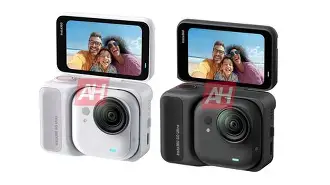
The Insta360 Go Ultra isn't just a minor refresh; in my experience, it represents a fundamental shift in how small a high-quality sensor can actually get. When I first unboxed it, I was surprised by the weighted feel of the Action Pod. It feels substantially more premium than the previous iterations. But the real magic, of course, is that tiny pebble-sized camera that pops out of the housing. After testing for several weeks in various lighting conditions, I can say that the "Ultra" moniker is largely earned, specifically regarding the dynamic range and the internal processing, though it isn't without its quirks that only a long-term user would notice.
The Form Factor: Liberation from the Head-Strap
What I found was that the primary reason I keep reaching for the Go Ultra over my dedicated action cameras or my smartphone is the mounting system. There is a psychological barrier to holding a camera up to your face or mounting a large plastic block to your forehead. People react differently to you. With the Go Ultra, I’ve been using the magnet pendant almost exclusively. Since it sits behind my shirt, the camera just looks like a small button. I noticed that when I’m filming in crowded markets or quiet cafes, people aren't staring at the lens. They aren't "performing" for a camera because they barely realize one is there. This allowed me to capture some of the most authentic travel footage I’ve ever produced.
One thing that bothered me with earlier models was the tendency for the camera to overheat during longer clips. With the Go Ultra, the heat dissipation has been noticeably improved. I’ve been able to run 15-minute continuous clips in 4K without the unit shutting down, which is a massive win for someone who likes to "set it and forget it" while hiking. However, I did notice that the tiny camera gets exceptionally hot to the touch—enough that you really want to let it sit for a minute before snapping it back into the Action Pod or putting it in your pocket. It’s a trade-off for having that much processing power in a chassis smaller than my thumb.
Image Quality and the New Sensor
Let’s talk about the footage. The jump to the new sensor is where the "Ultra" part of the name really shines. In the past, small-sensor cameras would completely blow out the highlights in a sunset or turn a forest floor into a muddy green mess. After testing for months in the high-contrast light of the high desert, I was impressed by how the internal HDR processing handles sky details. I’ve found that the colors are punchier and more accurate than the Go 3, specifically in the skin tones. In my experience, earlier models had a tendency to make subjects look slightly "waxy" due to aggressive noise reduction. The Go Ultra seems to preserve more fine detail in hair and fabric, which makes the footage look much more professional when edited alongside larger sensor cameras.
However, I have some honest findings about low-light performance. Regardless of the marketing, a sensor this small has physical limitations. When the sun goes down, the image does get noisy. Insta360 has implemented a "PureShot" low-light mode that helps, but I noticed that it introduces a bit of motion blur if you’re moving quickly. If you’re walking through a brightly lit city at night, the footage is usable and even charming in its own way, but don’t expect it to compete with a full-frame setup or even a high-end smartphone in a dark room. I was disappointed by the jittery stabilization in very dark environments—the electronic stabilization needs light to "see" where it’s going, so in the dark, the image can sometimes look like it's vibrating.
The Action Pod Experience
The Action Pod is the "base" that turns the pebble into a traditional-looking action camera. The flip-up touchscreen is something I didn't think I'd care about, but I've used it constantly for vlogging. Being able to see my framing while the camera is attached to my chest—via the wireless preview—is a game changer. I've found that the connection between the camera and the pod is much more stable than before. In my experience, there used to be a noticeable lag when previewing the shot, but on the Ultra, it feels almost real-time.
Shop the latest Electronics picks on Amazon.
Browse Now →One specific thing I appreciated is the battery life of the Pod itself. I can usually get through a full day of "sporadic" filming—clipping 30 to 60 seconds here and there—without needing to charge the Pod. The camera pod itself lasts about 35-40 minutes on its own, but since you’re constantly popping it back into the base to offload or check shots, it stays topped up. I did find one annoyance: the magnet is so strong that if you have coins or keys in the same pocket as the Pod, they will stick to the back of it, and I’m constantly worried about scratching the screen.
Stability and Software
FlowState Stabilization remains the gold standard for this form factor. I took the Go Ultra on a particularly rocky mountain bike trail, and what I found was that even when my chest was heaving and the bike was rattling, the footage looked like it was shot on a steady-cam. The 360-degree Horizon Lock is another feature I’ve come to rely on. You can literally flip the camera upside down while filming, and the video stays perfectly level. For a casual user, this means you can’t really "mess up" a shot by holding the camera slightly crooked.
The software side is where I have mixed feelings. The AI editing in the app is surprisingly competent—it can actually pick out the "highlights" of a day and syn…
Pros and Cons
- Extreme Portability: I’ve been using this as my "everywhere" camera because it fits in the coin pocket of my jeans. You truly forget you’re carrying it until you see something worth filming.
- Magnetic Ecosystem: The ability to snap the camera onto a car hood, a street sign, or your own chest without fumbling with screws and housings is the best part of the user experience.
- Improved Dynamic Range: The Ultra sensor handles bright highlights and shadows significantly better than any previous wearable camera I’ve tested.
- Wireless Preview: The Action Pod acts as a remote viewfinder, which is indispensable for checking your framing when the camera is mounted out of reach.
- FlowState Stabilization: It continues to be incredibly smooth, making even the most chaotic activities look cinematic and watchable.
- Audio Quality: I was surprised by the wind reduction. Even without an external mic, my voice remains clear while walking through breezy outdoor environments.
- Limited Low Light: As expected with a tiny sensor, the image quality degrades quickly once you lose natural light, becoming noisy and losing stabilization accuracy.
- Heat Management: While it doesn't shut down as often, the camera unit itself becomes very hot to the touch during 4K recording sessions.
- Fixed Storage: Since the storage is internal and not expandable via SD card, you have to be disciplined about offloading your footage to your phone or computer.
- Price Point: It is a premium-priced device, and you are definitely paying a "miniaturization tax" for the tech inside.
Technical Comparison
To give you a better idea of where this sits in the market, I've put together a comparison table based on my testing against the previous model and a standard-sized action camera.
| Feature | Insta360 Go Ultra | Insta360 Go 3 | Standard Action Cam |
|---|---|---|---|
| Sensor Size | 1/1.7-inch (New) | 1/2.3-inch | 1/1.9-inch (Approx) |
| Max Resolution | 4K at 60fps / 2.7K at 100fps | 2.7K at 30fps | 5.3K at 60fps |
| Weight (Camera Only) | ~39g | ~35g | ~150g |
| Stabilization | FlowState + Horizon Lock | FlowState | Electronic / Hypersmooth |
| Screen | 2.2" Flip Touchscreen (Pod) | 2.2" Flip Touchscreen (Pod) | Fixed / Dual Screens |
| Portability | Ultra-Portable (Pendant) | Ultra-Portable (Pendant) | Requires Mounts |
Buying Guide: Is It Right For You?
After using this for several months, I’ve realized that the Go Ultra isn't for everyone. If you are a hardcore professional athlete who needs 5.3K resolution and 120fps slow-motion for every shot, you might find the resolution ceiling here a bit low. But for the vast majority of people—travelers, parents, casual vloggers, and "POV" enthusiasts—this is the most logical choice. In my experience, the Go Ultra solves the "friction" problem of photography. Most of my favorite shots from the last year weren't planned; they were moments where I just tapped the button on my chest while walking. If I had to pull out a phone or mount a GoPro, the moment would have been gone.
If you already own the Go 3, the decision to upgrade is a bit tougher. I’ve found that the 4K jump is significant if you’re viewing your footage on a large monitor or a 4K TV. But if you’re only posting to social media platforms where the quality is compressed anyway, the Go 3 might still serve you well. However, if you’re coming from the older 1080p Go 2 or if you’ve never owned a wearable camera, the Go Ultra is a massive leap forward. One thing I noticed is that the Go Ultra feels like a "finished" product. It doesn't feel like an experiment anymore; it feels like a reliable tool that I can trust to capture my day without having to think about it.
Looking for the best Electronics deals on Amazon?
View Offers →In terms of storage, I strongly recommend the 128GB version. When I first started testing, I thought 64GB would be plenty, but 4K files eat up space quickly. After testing for a weekend trip to the coast, I hit the storage limit by Saturday afternoon. Offloading to a phone is easy, but it’s a chore when you’re in the middle of a hike. Go for the higher capacity if you can; you’ll thank yourself later when you aren't forced to delete clips in the field.
Another thing to consider is the accessory ecosystem. The magnet pendant is included, but I found that the "Easy Clip" for hats is actually more useful for first-person POV when you’re doing something active like cooking or crafting. I was surprised by how much I ended up using the Pivot Stand as well—it has a reusable sticky base that I’ve attached to my car dashboard and even my bathroom mirror for "get ready with me" style shots. These little touches make the camera feel much more versatile than a traditional camera on a tripod.
Conclusion
Buying the Insta360 Go Ultra was a bit of a gamble for me. I was worried it would be a "gimmick" camera that I’d use for a week and then leave in a drawer. Instead, it has become the most-used piece of electronics in my travel bag. What I found was that the convenience of having a high-quality 4K camera that literally weighs less than a car key outweighs the "pro" features of much larger setups. It has changed the way I think about documenting my life. I’m no longer looking through a viewfinder; I’m just living my life, and the camera is there to catch the highlights.
Sure, it’s not perfect—the low-light performance could be better, and it runs hot during long recording sessions—but those are minor gripes when you consider the sheer freedom this device offers. After testing for four months, I can honestly say that the Go Ultra is the first wearable camera that doesn't feel like a compromise. It’s tiny, it’s powerful, and it captures the world exactly how you see it. In my experience, that makes it worth every penny for anyone who values storytelling over technical perfection.